Klair Vu
Klair VuInteractive Product Tour
← → to move · F fullscreen
Product Tour · 3 minutes · no login needed

See how a security team runs on Klair Vu

Eight screens, one story: every scanner, cloud, pentest and audit signal lands in a single operating system — mapped to your applications and business units, ranked by real exploitability, and explained in plain English. Use the arrow keys or the dots below to walk through.

Step 1 · The cockpit

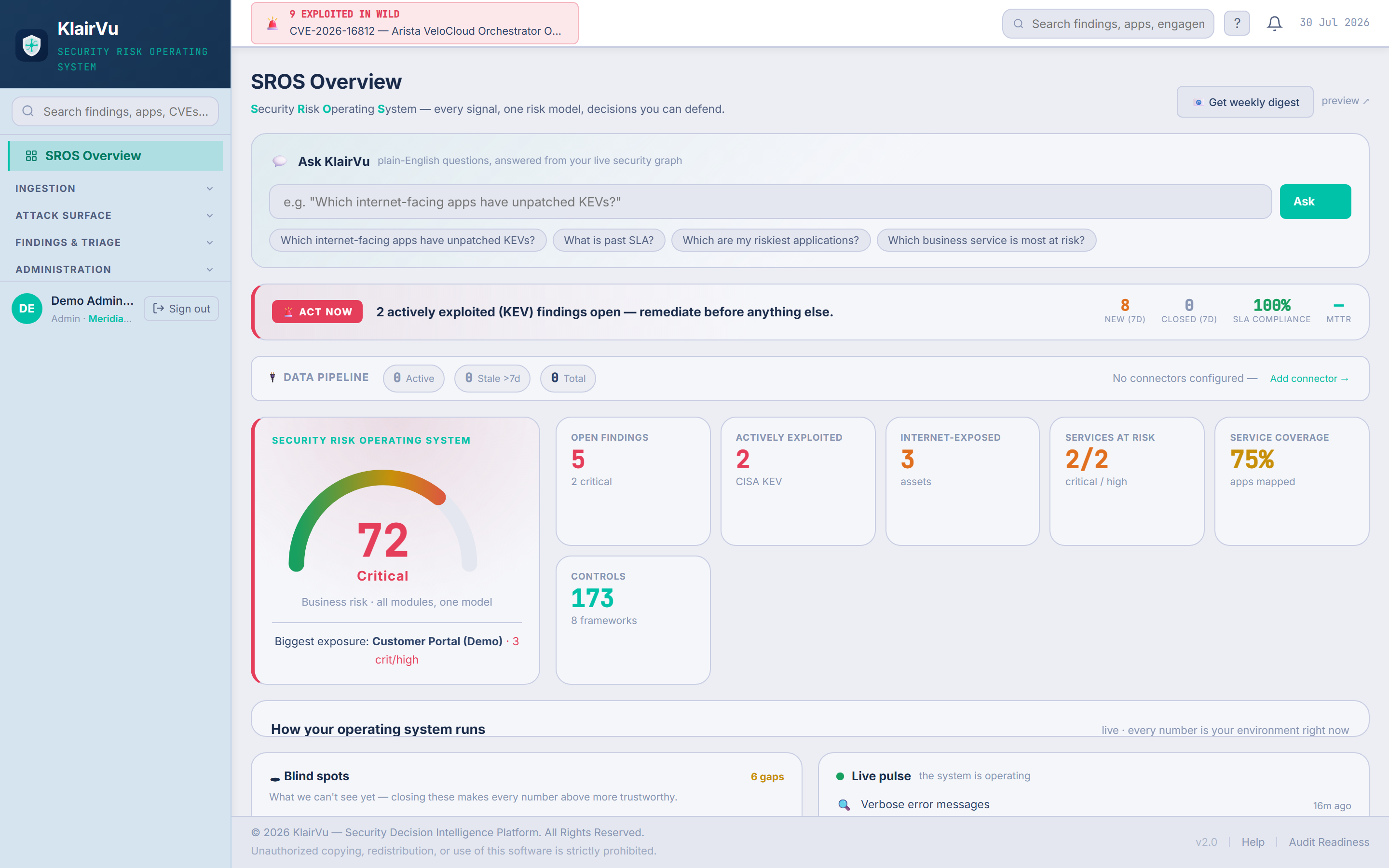
One score the whole company can read

The SROS Overview turns every connected signal into a single business-risk score — with the numbers behind it one glance away. This is the screen a CEO, an auditor and an analyst can all read without translation.

  • Live "exploited in the wild" ticker at the top — CISA KEV, checked against your assets.
  • Every tile is a question a board asks: what's open, what's exploited, what's exposed.
  • Service coverage shows how much of the estate is actually mapped — honesty built in.
app.prakknit.com — SROS Overview
Klair Vu SROS Overview — live risk score, actively exploited findings, Ask Klair Vu
Real product screen · live environment · demonstration data.
Step 2 · Ask Klair Vu

Plain-English questions, answered from your live security graph

No query language, no dashboard-hunting. Ask the question the way your MD would ask it — the answer comes from the same graph that powers every score on the platform.

  • Try it: click any question chip on the right.
  • Answers name the exact apps, owners and deadlines — not generic advice.
  • The same engine writes the weekly digest your leadership receives.
app.prakknit.com — Ask Klair Vu
Answer · from your live security graph

Click a question above to see how Klair Vu answers it.

Interactive demo — answers are sample data.
Step 3 · Findings & Triage

Every source lands in one place — always mapped to an app and a business unit

Nessus, Qualys, cloud posture, manual pentests, bug bounty — all findings flow into a single page. Nothing floats free: each finding belongs to an application and a business unit, so accountability is never a mystery.
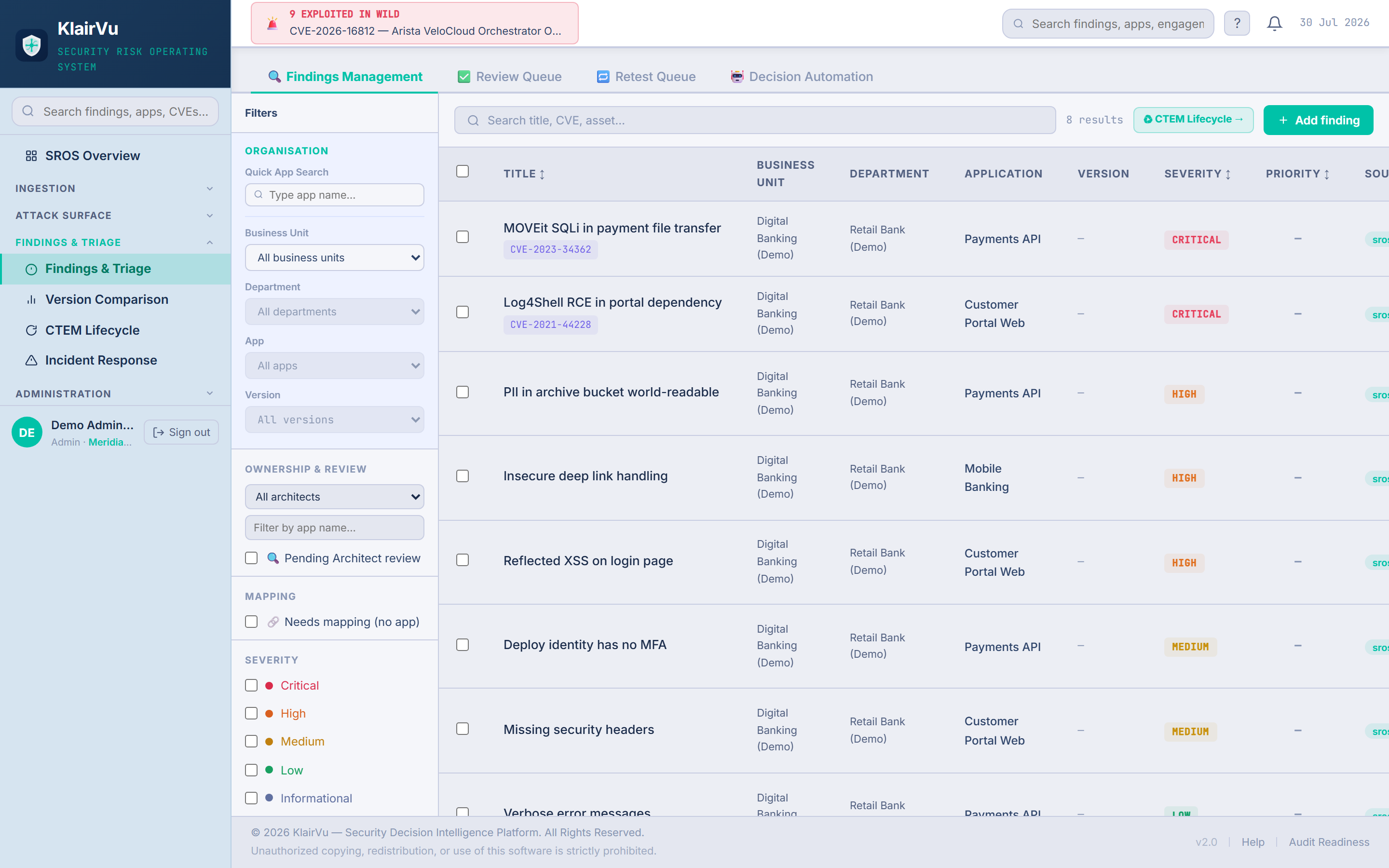
  • One finding arrived unmapped — Klair Vu flags it instead of hiding it.
  • Map it once and the platform learns: the same source maps automatically next time.
  • Review Queue, Retest Queue and Decision Automation sit one tab away.
app.prakknit.com — Findings Management
Klair Vu Findings & Triage — unified findings mapped to business units and applications
Real product screen · live environment · demonstration data.
Step 4 · Attack Surface Intelligence

The queue that knows what attackers actually exploit

A CVSS score treats every critical the same. Klair Vu ranks by composite priority — exploitation in the wild, internet exposure, business criticality — so the two findings matching CISA's Known Exploited Vulnerabilities list score 108 and sit on top, while a lower-context finding scores 33.
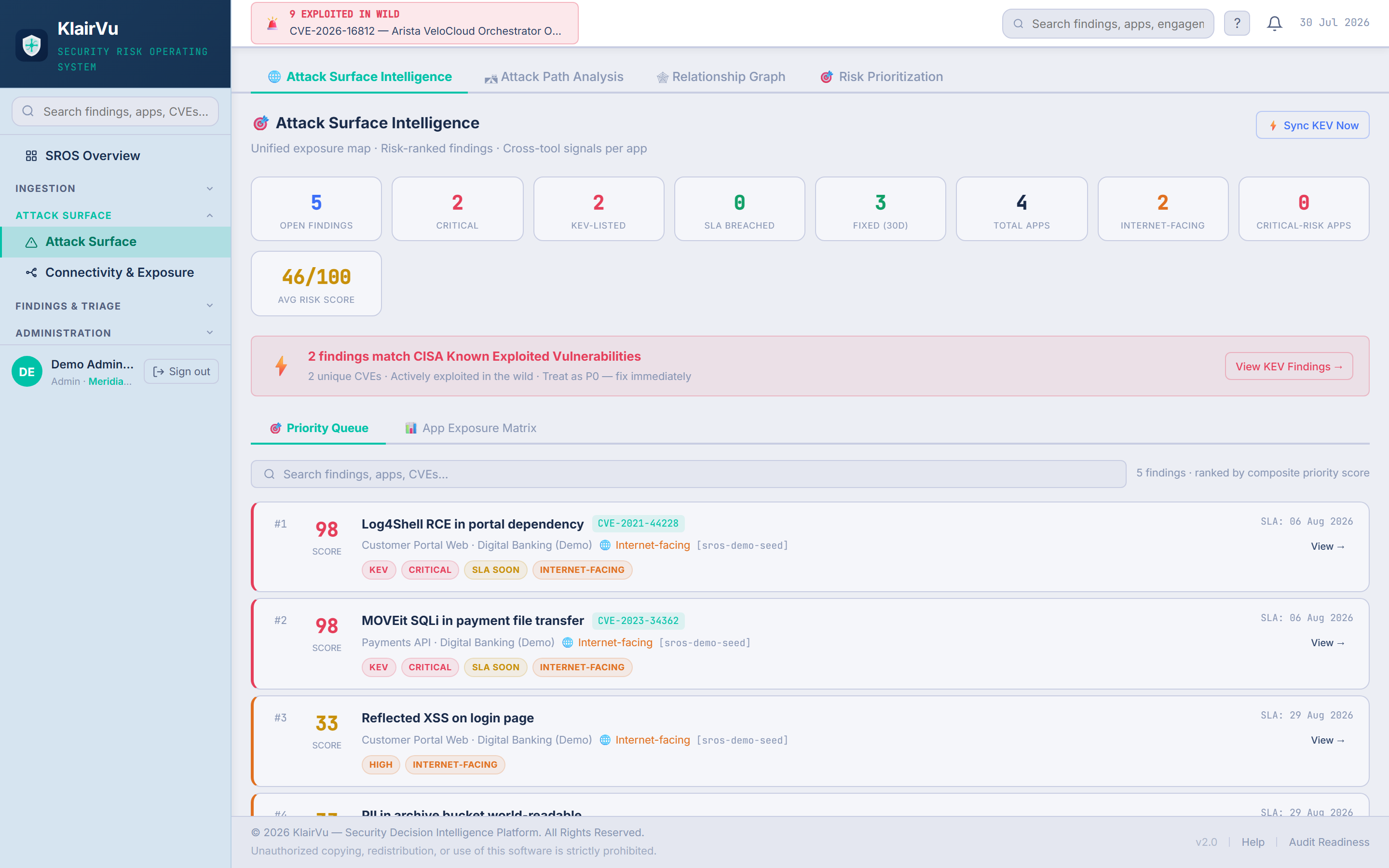
  • Score 108 vs 33 — same severity class, different context, different urgency.
  • The KEV banner says it plainly: "Treat as P0 — fix immediately."
  • KEV sync runs continuously against your actual asset inventory.
app.prakknit.com — Attack Surface · Priority Queue
Klair Vu Attack Surface — priority queue ranked by composite exploitability score, KEV findings on top
Real product screen · live environment · demonstration data.
Step 5 · CTEM Lifecycle

Exposure management as a continuous loop, not an annual audit

Klair Vu operationalises Gartner's CTEM model: discover, prioritise, validate, mobilise, measure — and scores your maturity while you run it, so improvement is visible quarter over quarter.
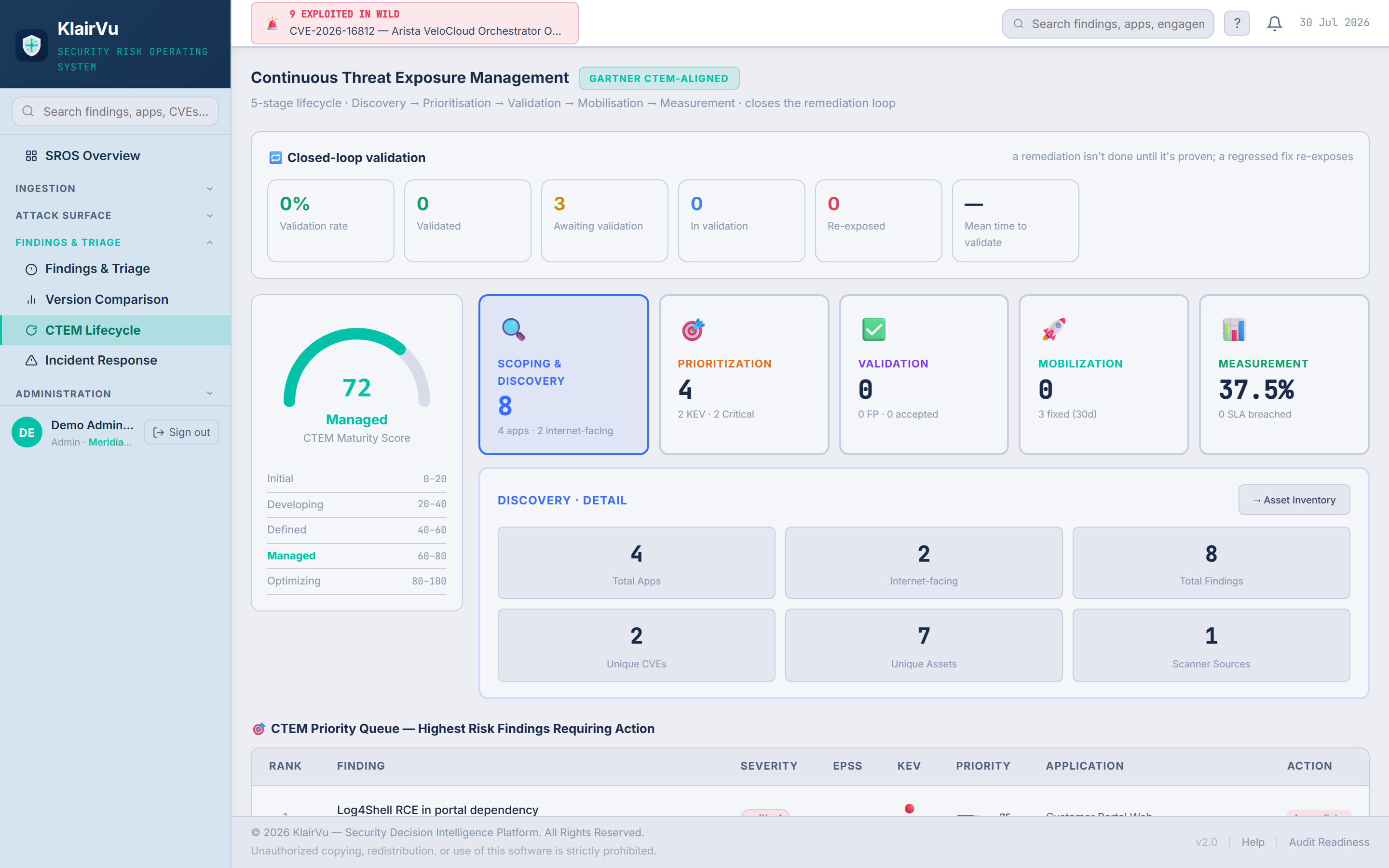
  • The maturity score gives leadership a trend line, not just a snapshot.
  • Each stage pulls from the same graph — no re-entry, no reconciliation.
  • Validation ties into retest queues and automated pentesting.
app.prakknit.com — CTEM Lifecycle
Klair Vu CTEM Lifecycle — maturity score, five-stage loop, closed-loop validation
Real product screen · live environment · demonstration data.
Step 6 · Risk Intelligence

A formal risk register the auditor will actually accept

ISO 27001 / NIST CSF compliant register with treatment plans, ownership and board escalation — fed automatically by the findings underneath it, so the register and reality never drift apart.
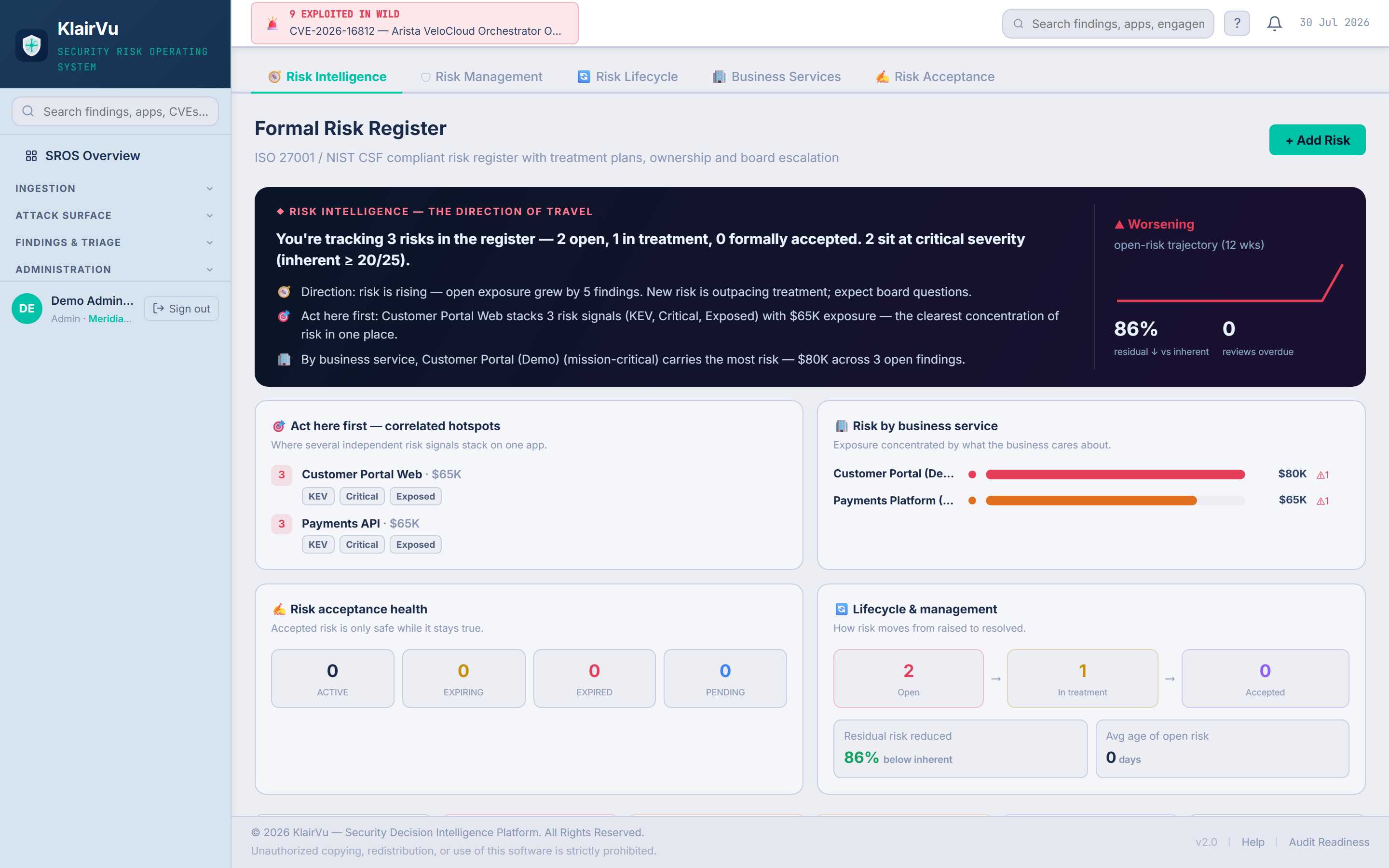
  • Every risk shows inherent vs residual — proof that treatment works.
  • Accepted risk expires and comes back for review — acceptance is never forever.
  • Direction-of-travel banner answers the board's only real question: better or worse?
app.prakknit.com — Formal Risk Register
Klair Vu Risk Intelligence — formal risk register with direction-of-travel narrative and correlated hotspots
Real product screen · live environment · demonstration data.
Step 7 · Compliance & GRC

Audit readiness as a live number, not a fire drill

Controls mapped across ISO 27001, SOC 2, PCI-DSS, NIST CSF and more — scored continuously from live findings via the crosswalk. Evidence links back to the findings and assets that prove each control, so audit prep becomes an export, not a quarter of panic.
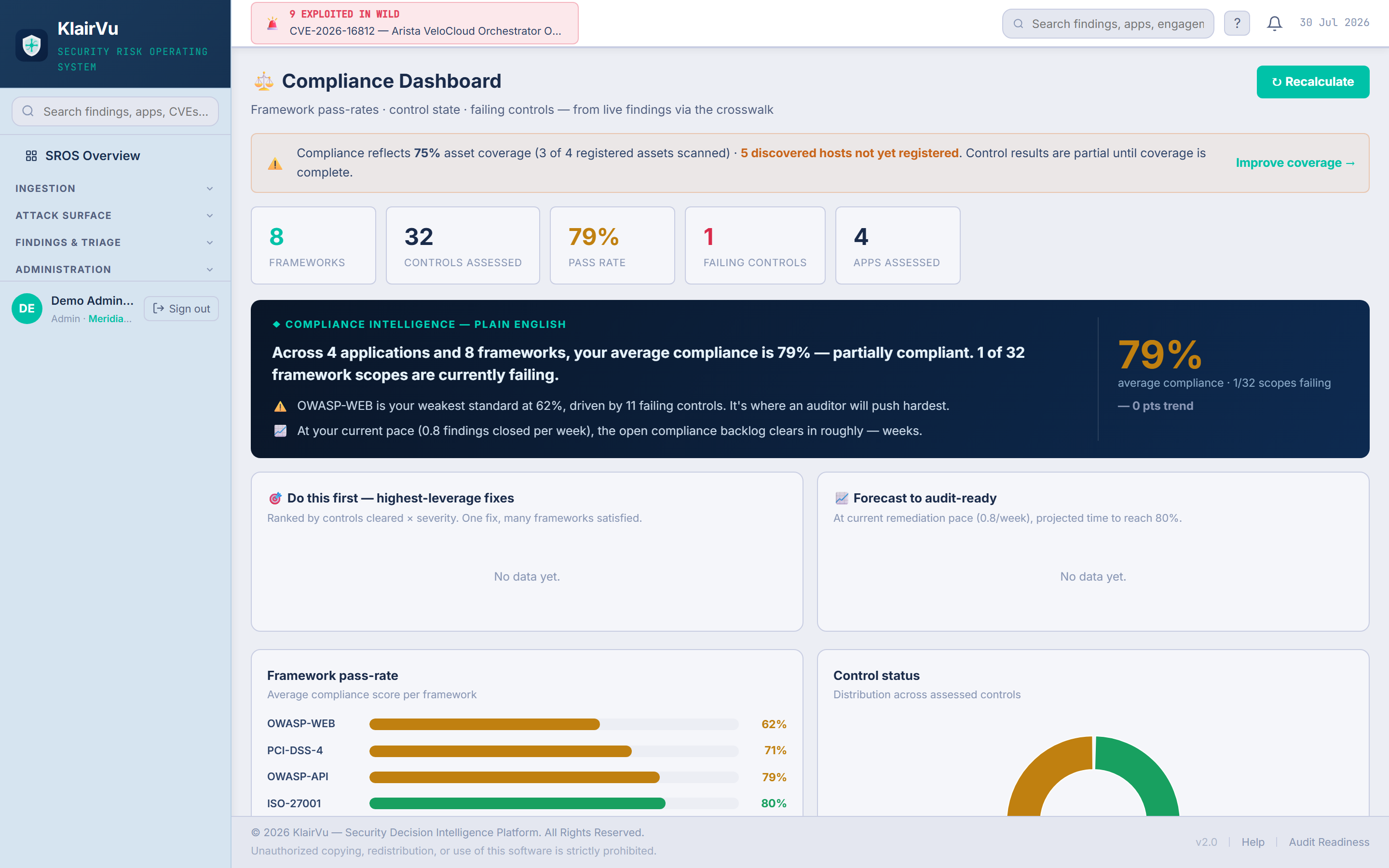
  • One control, many frameworks — satisfy it once, score everywhere.
  • Pass-rates move in real time as findings close.
  • Plain-English intelligence names your highest-leverage fix — one fix can clear 7 controls.
app.prakknit.com — Compliance Dashboard
Klair Vu Compliance Dashboard — framework pass-rates, plain-English intelligence, highest-leverage fixes
Real product screen · live environment · demonstration data.
That's the tour

From every tool's noise to the two that matter — every day, automatically

One platform ingests everything, maps it to your business, ranks it by real exploitability, and explains itself in plain English — to your engineers, your auditors and your board.

All product views in this tour are illustrative with sample data. Prak Technologies · prakknit.com